
GOODFRIENDS / PARTNER SETTLEMENT
Casino partner settlement and affiliate management solution
GoodFriends connects a multi-level partner hierarchy with per-partner rates and permissions in one structure. Rolling and losing accruals, settlement cycles, the partner portal and the company P&L screen work as one flow, so you can apply casino partner settlement rules consistently.
Multi-level sub-partner hierarchy and relationship chart
The operator registers partners in the operator admin, and each partner registers and manages sub-partners and players within the permissions granted. You can build sub-partner hierarchies with multiple levels to set up an organization that fits how you operate.
The relationship chart expands the links from site to partners to players so you can review your organization’s structure.
Multi-level hierarchy
Place sub-partners at multiple levels under parent partners, with each partner managing its own players.
Relationship chart
Expand each level from site to players to understand the state of your organization.
Management limited to the downline
Partners can manage only their own downline, so they cannot edit partners or players in other lines or pay or recover their money.
Activity logs
Review player, partner and operator activity in the operator admin’s log menu.
Differential rolling and losing rates for casino, slots and sports
Rolling and losing settlement rates are set for each partner by category: casino, slots and sports. Rolling accrues by applying the rate to the betting amount of the partner’s players, and losing accrues by applying the rate to the base amount chosen for each partner.
When a sub-partner is registered or its rate is edited, the rate cannot exceed the parent’s rate, and the parent partner receives the difference between the two rates. The same distribution applies however deep the hierarchy goes, keeping the settlement structure consistent.
Rates by category
Apply different rolling and losing rates to casino, slots and sports to match the nature of each game type.
Parent rate cap
When registering a sub-partner or editing rates, values above the parent partner’s rate are not applied.
Distribution by rate difference
Parent partners accrue the difference between their own rate and their sub-partners’ rates, so there is no need to calculate the parent’s share separately.
Choice of losing settlement basis
Choose each partner’s losing settlement basis: bets minus wins, or bets minus wins and rolling.
Automatic settlement cycles and the partner settlement screen
In the operator admin, set whether automatic settlement is used and the settlement dates for each site. Once you set monthly settlement dates, partner earnings are settled automatically on those dates, reducing repetitive settlement work.
On the operator admin’s partner settlement screen, expand the hierarchy to see each partner’s total bets, revenue, and rolling and losing payouts. Parent and sub-partner rates are shown as well, so you can check that payouts follow the differential rates you set.
Monthly settlement dates
Choose one or more settlement dates each month to set a cycle that fits how you operate.
Automatic settlement
Accrued rolling and losing earnings are settled automatically on the dates you set.
Next settlement date
For sites with automatic settlement on, the next settlement date is shown in an operator admin dashboard widget and on the partner portal dashboard.
Settlement details by level
Expand from parent partners down to sub-partners to compare total bets, revenue and payouts.
Partner portal: earnings, members, history and wallet
GoodFriends provides a partner portal separate from the operator admin. On the dashboard, partners check their earnings, upcoming settlements and downline status, and look up their players’ betting and transaction history directly.
We configure the partner portal address to match your brand domain, and the portal is available in Korean, English, Japanese and Simplified Chinese.
Dashboard
See your earnings, upcoming settlements and downline status on the first screen.
Member management
Register sub-partners and players and manage your members within your permissions.
Betting and transaction history
Look up your players’ betting and transaction history to verify the basis for settlement.
Money top-ups and withdrawal requests
Top up money by bank or crypto deposit, and request withdrawals when needed.
Coin wallet
After setting up OTP, partners receive their own coin wallet to make deposits and check the balance.
Contact the operations team
Exchange messages with the operations team via chat.
Per-partner permissions and session management
Permissions to register players, edit rates, pay money and recover money are granted to each partner individually. The system blocks actions a partner is not permitted to take, and partners cannot change their own permissions.
GoodFriends configures the menus shown on the partner portal to match how your brand operates. The menu setup applies equally to all partners of the brand.
Player registration permission
Choose which partners can register players directly.
Rate editing permission
Separately choose which partners can edit sub-partner rates; the parent rate cap still applies.
Money payout and recovery permissions
Grant the permissions to pay money to and recover money from sub-partners and players separately.
Single active session
If the same account logs in on another device, the previous session is ended and a notice is displayed.
Company P&L, GGR and NGR with partner settlement reflected
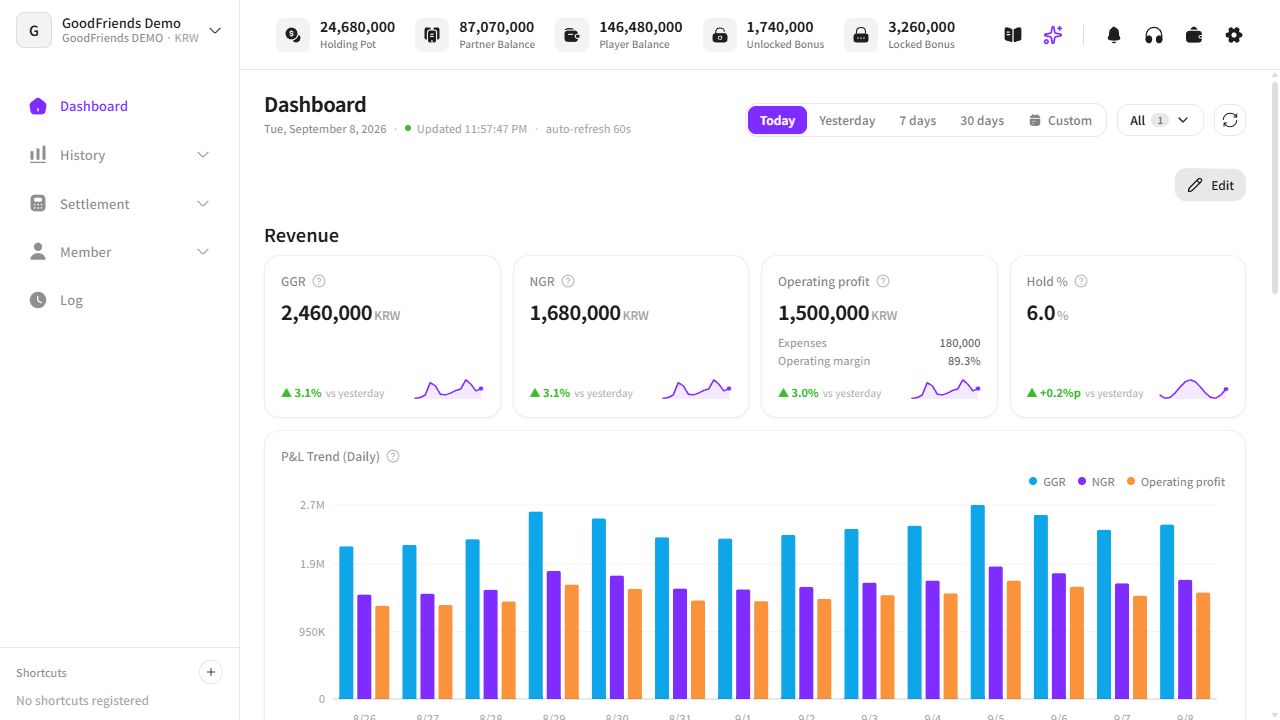
The company P&L screen shows daily total bets, gross gaming revenue (GGR), net gaming revenue (NGR), expenses and operating profit, and you can select a date to see the details. Because NGR is calculated after deducting partner rolling and losing, you can assess partner settlement results together with company profit and loss.
The glossary explains what each metric means and how it is calculated.
Daily P&L table
Follow each day from total bets through to operating profit, and select a date to view the details.
Metrics glossary
See what each on-screen metric means and how it is calculated.
AI assistant lookups
Ask the AI assistant in the operator admin about partner status or profit and loss for a period, and it answers with tables and charts along with the supporting data. Staff carry out actual actions such as approvals and payouts themselves.
FAQ
What is the difference between rolling and losing settlement?
Rolling accrues by applying the rate to the betting amount of the partner’s players. Losing applies the rate to a base amount chosen for each partner, either “bets minus wins” or “bets minus wins and rolling.”
Do partners get their own dedicated portal?
Yes. A partner portal is provided separately from the operator admin. On the partner portal, partners check their earnings, upcoming settlements, downline status, and their players’ betting and transaction history, and can also top up money, request withdrawals and chat with the operations team. It is available in Korean, English, Japanese and Simplified Chinese, and we configure the partner portal address to match your brand domain.
We will help you define your partner structure and settlement rules in a consultation.
Tell us on Telegram about the partner hierarchy, rates and settlement cycle you plan to use, and we will recommend a suitable setup.
Contact us